

DegreeWorks & Student Educational Planner
What is DegreeWorks?
DegreeWorks is Detroit Mercy's degree audit and academic planning tool. It shows you, in one place, how the courses you've completed and are currently taking apply toward your declared program, and what you still need to finish before you graduate.
DegreeWorks includes two tools:
- Degree Evaluation – tracks your progress toward your declared major, minor, or program requirements
- Student Educational Planner (SEP) – helps you and your advisor map out which courses to take, and in what order, across future semesters
DegreeWorks does not replace registration. You'll still register for classes through My Portal, but DegreeWorks is the best way to check your progress and plan ahead before you do.
How to access DegreeWorks
- Log in to My Portal
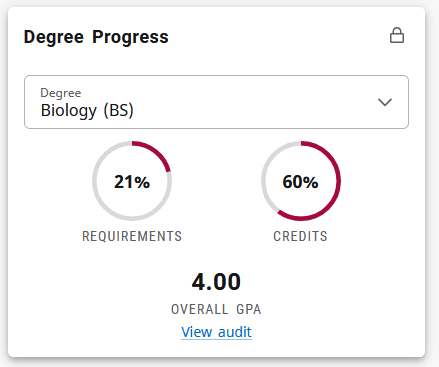
- Look for the Degree Progress card and click on "View audit"
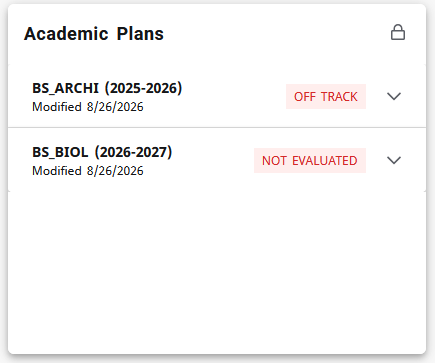
- Or Academic Plans to view or build your program plan.
What you can do in your Degree Audit:
- See which requirements you've completed, which are in progress, and which are still needed for your declared major, minor, or program
- Run a What-If audit to see how your completed coursework would apply if you changed or added a major or minor
- View how transfer credit, AP, IB, or CLEP credit applies to your requirements
- Check your overall GPA and credit hours toward graduation
- Use links within the audit to jump to course descriptions and current sections
What you can do in your Student Educational Planner:
- Work with your advisor to build a semester-by-semester plan of the courses you plan to take
- View notes your advisor adds about a specific course or requirement
- See whether you're on track with your plan heading into registration
- Adjust your plan as your interests or timeline change, with your advisor's input
Getting started:
- New to DegreeWorks? Watch our short walkthrough video: [coming soon!]
- Have questions about what your audit is showing you? Bring it to your advising appointment. Your advisor can walk through it with you and help you plan your next semester.
- Think something looks wrong? Contact the Office of the Registrar. Substitutions, waivers, and transfer credit updates are processed by our office or your academic department.
Frequently Asked Questions
Does DegreeWorks register me for classes? No. DegreeWorks helps you plan and track progress. You still register through My Portal.
Why don't I see a class I'm currently taking on my audit? Audits update overnight. If a class was just added, check back the next day. If it's still missing after that, contact the Registrar's Office.
What if I'm considering changing my major? Use the What-If audit to see how your current coursework would apply to a different program before you make the switch official.
Who do I contact with questions? Most questions should be directed to your Academic Advisor. If you have issues with the system itself, please contact the Office of the Registrar at registrar@udmercy.edu.